
Chartbook Builder
Drag. Drop. Done.
Create stunning, client-ready chartbooks in 5 minutes with our intuitive builder—then automate delivery forever.
No more PowerPoint nightmares. No more copy-pasting charts. Build multi-page chartbooks with institutional-quality design, schedule automated updates, and send them directly to clients—all from one platform.
The most Intelligent Chartbook
Platform Built
for Financial Advisors
Chartbook Builder combines drag-and-drop simplicity with institutional-grade output. Create once, automate forever. Your clients get professional insights weekly—you get Sunday mornings back.
Comprehensive
Chart Library
100+ pre-built charts from Fundstrat's research library, plus all your AI-generated custom charts in one organized place.
Client-Ready
Templates
Start with our curated layouts or create your own. Multi-page, multi-chart, perfectly formatted—every time
One-Click
Automation
Schedule weekly, monthly, or event-triggered delivery. Charts update automatically with fresh data. You set it once.
White-Label
Ready
Your logo. Your colors. Your client relationships. We're invisible unless you want us visible.
Chartbook Builder Adapts to
Any Workflow
Research-Driven RIAs
Comprehensive, data-rich chartbooks for investment committees and institutional-style analysis.
How They Use Chartbook Builder:
- - Create 20-30 page deep-dive chartbooks
- - Combine macro indicators, sector analysis, and technical signals
- - Schedule monthly investment committee chartbooks
- - Include detailed data source citations and methodology notes
Example Chartbook:
- "Monthly Investment Committee Review"
- - 25 charts across
- - Regime analysis, correlation studies, forward return scenarios
- - Automated monthly delivery 3 days before meeting
- - Exported as PDF and for presentation
Client-Facing RIAs
Clean, storytelling-focused chartbooks for quarterly client reviews and ongoing communication.
How They Use Chartbook Builder:
- - Build 6-10 page client-friendly chartbooks
- - Focus on clear visuals with minimal jargon
- - Schedule weekly market updates automatically
- - Customize cover page with client name for personal touch
Example Chartbook:
- "Your Weekly Market Snapshot"
- - 8 charts across 6 pages
- - Market performance, economic indicators, portfolio context
- - Sent every Monday at 7 AM to 100+ clients
- - Mobile-optimized web link delivery
Asset Managers & Portfolio-Focused RIAs
Portfolio-specific chartbooks showing holdings, exposures, and attribution analysis
How They Use Chartbook Builder:
- - Create customized chartbooks for each client portfolio
- - Include benchmark comparisons and sector weights
- - Schedule monthly performance reports
- - Add commentary explaining attribution
Example Chartbook:
- "Q4 2025 Portfolio Performance Review"
- - 12 charts showing the different holdings of the portfolio
- - Side-by-side portfolio vs. benchmark comparisons
- - Exported as editable PDF for client meetings
Growth-Oriented RIAs
Punchy, visual chartbooks perfect for social media, content marketing, and brand building
How They Use Chartbook Builder:
- - Create short, impactful 3-5 page chartbooks
- - Focus on single powerful charts with strong narratives
- - Export individual charts for social media posts
- - Use as lead magnets for prospect nurturing
Example Chartbook:
- "3 Charts That Explain This Market"
- - 3 hero charts, full-page format
- - Punchy headlines and annotations
- - Web link for easy social sharing
Content-Led RIAs
Original, thesis-driven chartbooks that support newsletters, blogs, and media appearances.
How They Use Chartbook Builder:
- - Build narrative-arc chartbooks that tell a story
- - Combine charts with extensive commentary
- - Create "evergreen" chartbooks for content library
- - Export charts individually for blog posts and articles
Example Chartbook:
- "The Case for Value in 2026: A Data-Driven Perspective"
- - 15 charts telling a cohesive investment thesis
- - Heavy annotation and written analysis
- - Used as downloadable asset for newsletter subscribers
- - Referenced in podcast episodes and YouTube videos
From Blank Canvas to Client-Ready
in 5 Simple
Steps
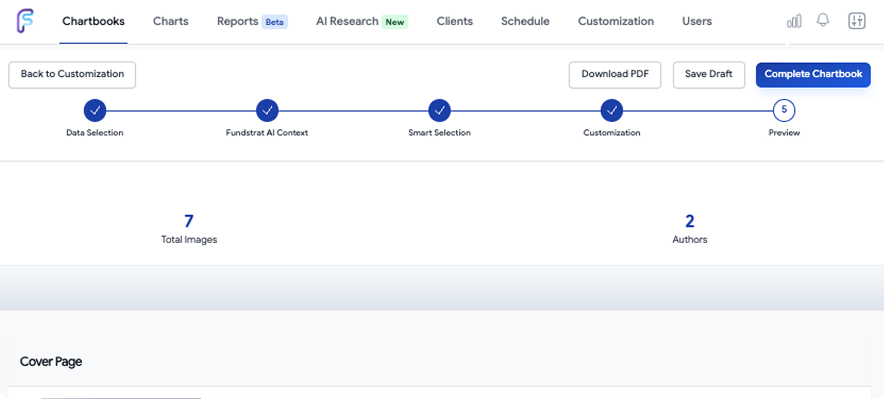
Step: 1
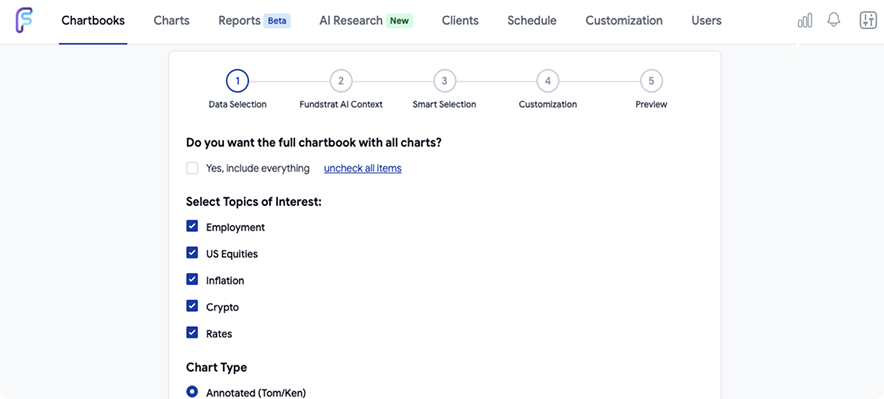
Choose Your Starting Point
Start from scratch, use a Fundstrat template, or clone your last chartbook for quick updates.
Templates Available:
- - Weekly Market Update (8 charts)
- - Monthly Economic Review (12 charts)
- - Quarterly Portfolio Review (15 charts)
- - Technical Analysis Summary (6 charts)
- - Custom layouts you've saved
Step: 2
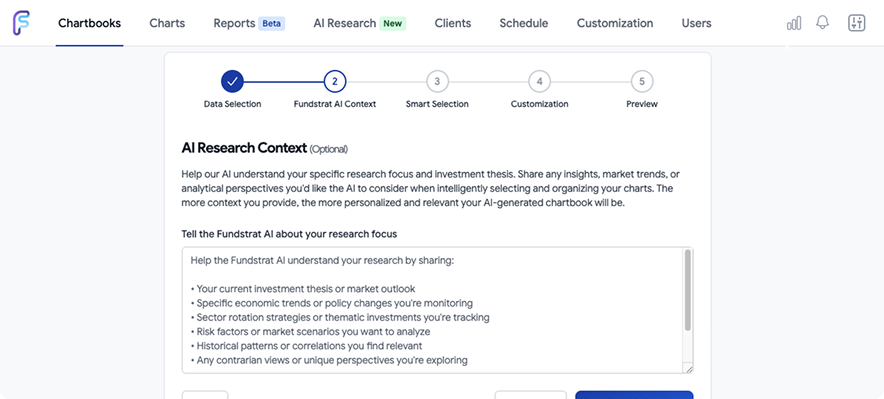
Add Your Charts
Start from scratch, use a Fundstrat template, or clone your last chartbook for quick updates.
Chart Sources:
- - Fundstrat curated library (100+)
- - Your AI-generated custom charts
- - Uploaded charts from other sources
- - Live data widgets (coming soon)
Step: 3
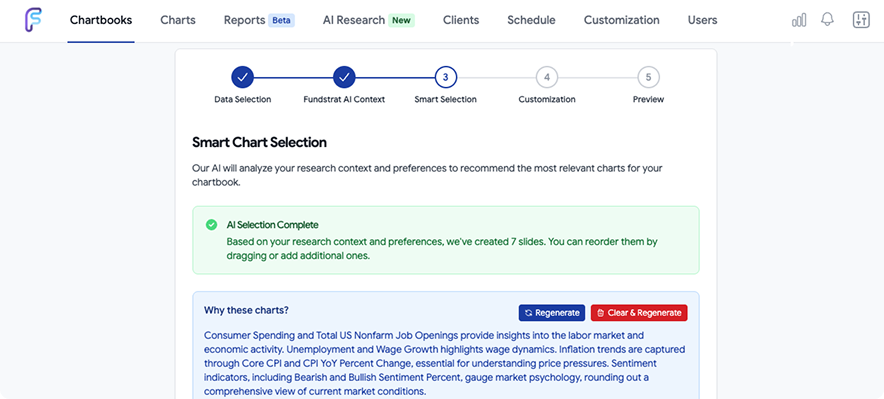
Arrange & Design
Choose single-chart, dual-chart, or grid layouts. Adjust sizing. Add page breaks. Everything snaps into place perfectly.
Layout Options:
- - Full-page single chart (maximum impact)
- - Side-by-side comparison (2 charts)
- - Grid view (4 charts per page)
- - Mixed layouts in same chartbook
- - Custom spacing and padding
Step: 4
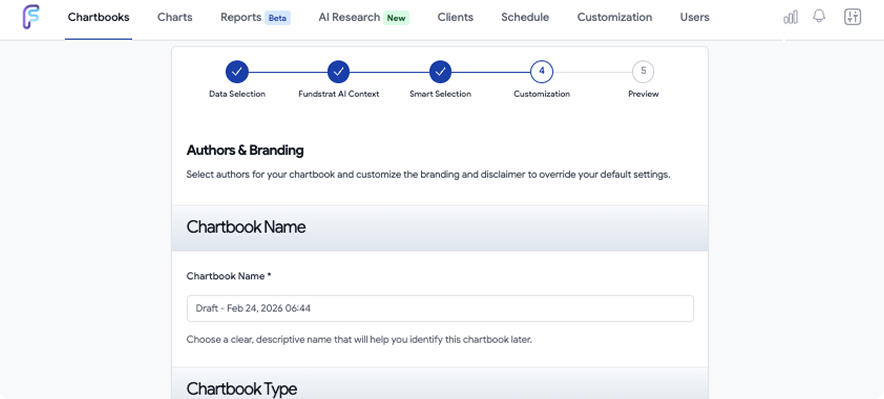
Brand & Customize
Apply your brand kit in one click. Add custom headers/footers. Write commentary. Include disclaimers
Layout Options:
- - Logo placement (header, footer, or watermark)
- - Brand color palette
- - Custom fonts
- - Cover page design
- - Page numbering
- - Data source citations
- - Compliance disclaimers
Step: 5
Export or Automate
Download immediately as PDF or share via web link, or schedule automated delivery to your client list.
Export Options:
- - PDF (standard or high-res)
- - Web link (mobile-optimized)
- - Email distribution
- - Scheduled automation
Time Comparison
| Task | Traditional Method | Chartbook Builder |
|---|---|---|
| Initial Build | 8 -12 hours | 5 minutes |
| Weekly Updates | 1-2 hours each | 0 minutes (automatic) |
| Monthly Time Saved | 0 | 8-10 hours |
| Client Delivery | Manual emails | Automated |
Powerful Features. Intuitive Interface.
Macro Charts and Chartbooks
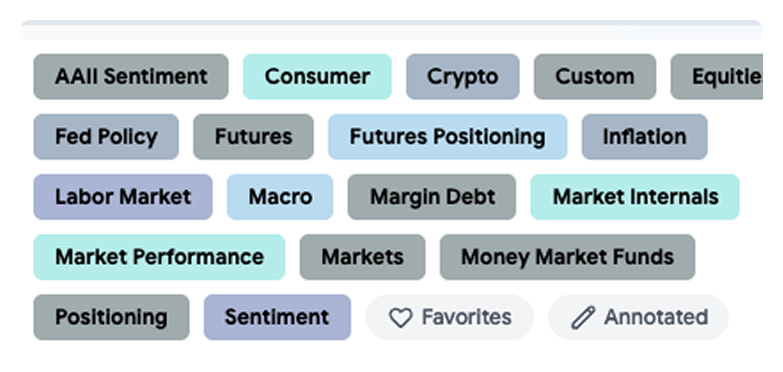
Choose from many types of categories for your macro charts.
Why It Matters
Provide a full view and monitor markets from a comprehensive set of categories.
Use Cases
- AAII
- Sentiment
- Consumer
- Crypto
- Custom
- Equities
- Fed Policy
- Futures
- Positioning
- Inflation
- Labor
- Market
- Macro
- Margin Debt
- Market Internals
- Market Performance
- Markets
- Money Market
- Funds
Smart Chart Updates
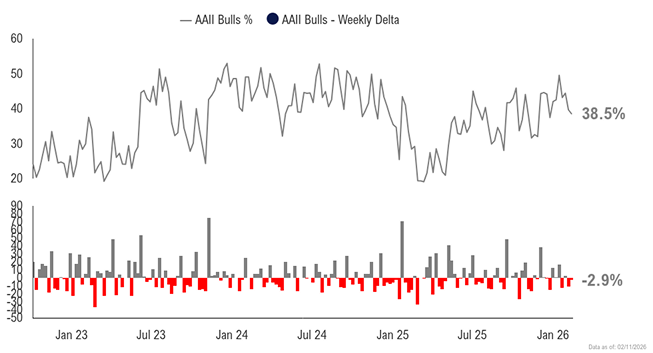
Charts are linked to live data sources. When data updates, your chartbook updates automatically—no manual refreshing.
Why It Matters
Your weekly market update should always have this week's data, not last week's. Automation frees mental bandwidth.
Use Cases
- Weekly chartbooks sent every Monday at 8 AM with Friday's close data
- Monthly reports generated on the 1st with prior month's complete data
- Real-time updates when major market events occur
Template Library & Customization
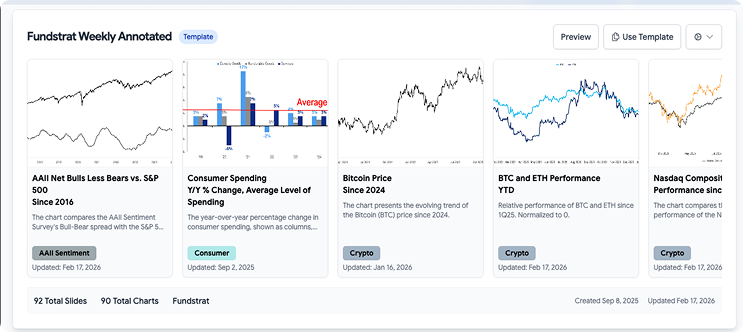
Pre-built templates from Fundstrat covering common use cases. Use as-is or customize to create your own reusable templates.
Why It Matters
Don't start from zero every time. Templates ensure consistency and save setup time.
Template Tom and Ken's
- - Weekly Annotated
- - Inflation
- - Labor
- - Sentiment
- - Equities
- - Macro Outlook
Annotation & Commentary Tools
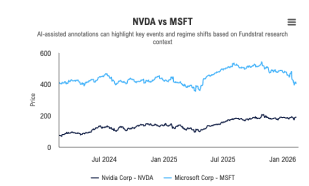
Add text boxes, arrows, highlights, and written commentary to any chart. Keep Fundstrat's annotations or write your own.
Why It Matters
Charts tell part of the story. Your insights complete it. Annotations help clients understand what they're looking at.
Annotation Options
- - Text callouts and labels
- - Arrows and shapes
- - Highlight boxes
- - Trendlines and markers
- - Hide/show Fundstrat annotations with toggle
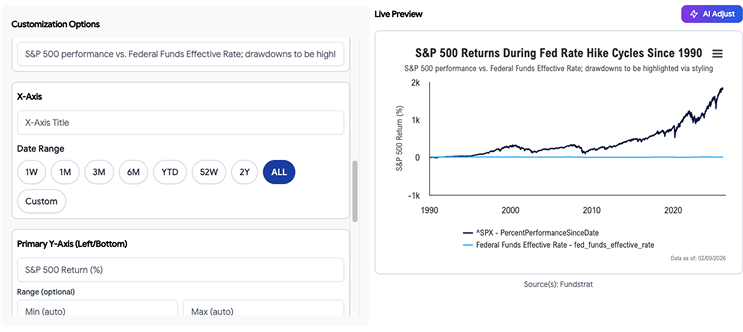
Automated Scheduling & Delivery
Why It Matters
Consistency builds trust. Automated delivery ensures your clients get insights reliably, without you having to remember.
Scheduling Options
- Recurring: Daily, weekly (choose day), monthly (choose date)
- Time-based: Send at specific time (e.g., Monday 8 AM ET)
- Recipient management: send to specific client segments
Client Portal Integration
Chartbooks can be published to your client email where clients can view, download, and access historical chartbooks anytime.
Why It Matters
Clients love having a access of your insights. It demonstrates ongoing value and gives them something to reference during market volatility.
Features
- - Clients will be able to download in PDF
- - Preview the chartbook in Web
- - Customization message for client delivery
- - Customization message for client delivery
Set It Once. Benefit Forever.
Creating the first chartbook is valuable. Delivering it consistently, with fresh data, every week for a year—without lifting a real time saver.
Time-Based Scheduling
- - Daily: Market opens/closes summary
- - Weekly: Monday morning market updates
- - Monthly: First of month economic reviews
- - Quarterly: Performance and portfolio reviews
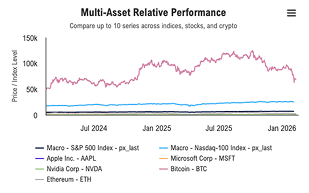
Event-Triggered Delivery
- - Market moves: S&P moves +/- 2% in a day
- - Volatility spikes: VIX crosses above 25
- - Fed announcements: FOMC meeting conclusions
- - Earnings season: Key company reports
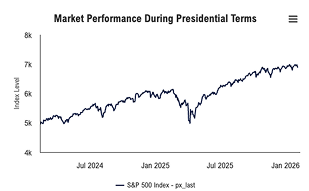
Client Segmentation
- - Send different chartbooks to different client groups
- - High-net-worth clients get detailed 20-page reports
- - Retail clients get simplified 6-page summaries
- - Prospects get abbreviated versions
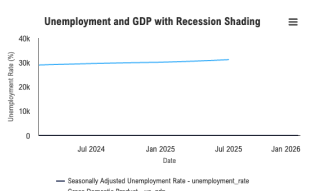
Multi-Channel Distribution
- - Email: Direct to inbox with PDF attachment
- - Portal: Auto-publish to secure client portal
- - Mobile: Push notification with web link
- - API: Integrate with your existing client communication tools
Frequently Asked Questions
Unlimited on all plans. Build as many as you need.
Yes. Edit the master chartbook anytime—changes apply to future automated sends. Past versions remain unchanged.
Chartbook Builder will use the most recent available data and flag the chart with a note. You'll be notified.
Yes. All paid plans include 100% white-label capability. Your brand only.
Upload images (PNG, JPG, PDF) directly into the builder. They'll be treated like any other chart.
Only if you export as PowerPoint. PDF and web links are locked. You control editability.
No hard limit, but we recommend 20-30 charts max for optimal client engagement.
Add required disclaimers in footer/header. Include data source citations. Export with version tracking for audit trails.
Yes (Professional plan and above). Segment clients by tags and send targeted chartbooks.
Other Features!
AI Chart
Generator
Generate custom charts instantly to add to your chartbooks.
Fundstrat
Annotations
Include Tom Lee's insights in your chartbooks automatically.
Automated
Reports
Go beyond chartbooks with full written reports.
Client
Communication
Hub
Join weekly group training sessions (free for customers).